
Make sure to enable your email and text alerts before you start!
You will be adding Purchased and Homemade products into the system. When entering your items you will see many options.
Only a few are required. Fill in as many fields as you want.
The more fields you fill in the better the system will work for you.
After you enter your items and start using them you will want to manage your items.
You can:
- Mark an item as 'Opened'
EX: open jar of pasta sauce and put the remainder in the frig. - Mark an item as 'Retired'
Click for more information on Retiring & Cloning an item. - Clone an item
- Move an item to a different Storage Location
- Delete an item
EX: You opened an item that you don't want in the system anymore.
To quickly get started below you will find basic examples. To view other examples go to Input Examples.
2. Add Purchased & Homemade Products
3. View your inventory
Before you can add items into the system you must create custom Storage Locations and custom Stores Where You Shop.
Below you can read through a detailed tutorial for managing storage locations and stores.

On this page you will manage your storage locations & stores.
Click Create to create a storage location.

Type in the name. You may also want to make a quick note about the location.

After you hit the SAVE button you will be brought back to the Manage Storage Location & Stores page.
To edit a Storage Location or Store click on the name in the list.
To create a Store Where You Shop follow the same steps above by clicking create a new store where you shop.

Below you can read through a detailed tutorial for adding a basic Product Item.
Basic Example: Purchased Can of Del Monte French Style Green Beans No Salt Added
Placed them in your Lazy Susan
Want an alert sent 1 month before exp.
The RED text & asterisk indicate that this is a required field.Product Company & Product Title
Enter the following values:
Product Type: Del Monte
Product Item Title: French Style Green Beans No Salt Added

Product Type & Storage Location:
Use the Search to find Canned Beans and click the Add button

You must create your storage locations in order to choose them from the select list.
Select Lazy Susan
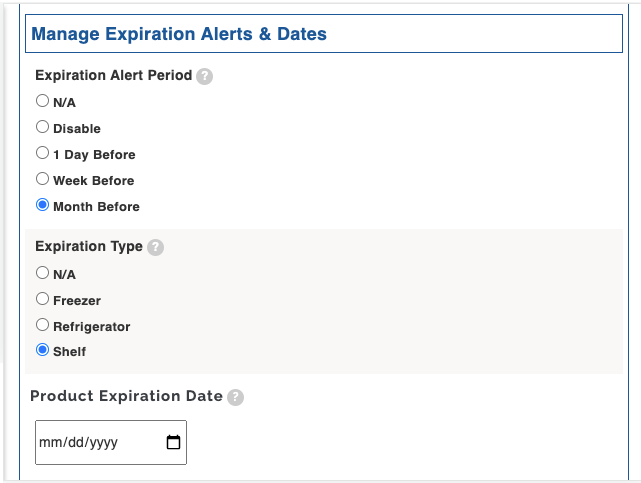
Expiration Alerts & Dates
Expiration Alert Period: Month Before
Expiration Type: Shelf
Product Expiration Date: Enter the expiration date on the can
Manage Quantity
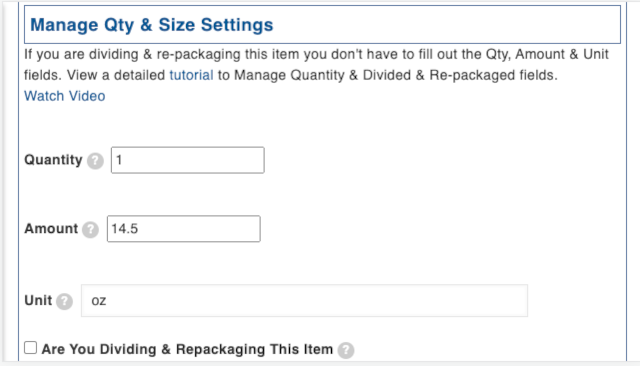
Fill out the fields below for purchased item that are NOT going to be re-packaged.
If you were re-packaging the item you would click the box next to: Are you Dividing or Repackaging this Item?
Product Details
Fill out the remaining optional fields.

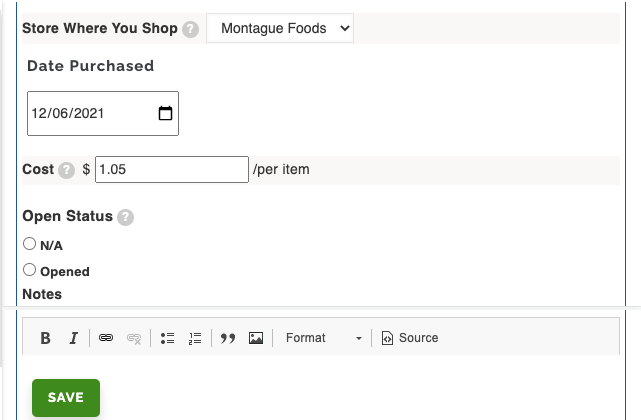
Opened Status: Leave this set to N/A
Notes: Use this to add a note about the item.
Save the Product Item!
Below you can read through a detailed tutorial for adding a homemade Product Item.
Made Homemade Chili with 88% Lean Ground Beef
Placed them in your Basement Freezer
Created 3 packages with 4 servings per package
Want an alert sent 1 week before exp.
The RED text & asterisk indicate that this is a required field.Product Title
Check the Is This a Homemade Item box and add the Title

Product Type & Storage Location:
You can enter multiple types. Use the Search to add Canned Beans and click the Add button
Also add Beef, Ground & Patties

You must create your storage locations in order to choose them from the select list.
Select Basement Freezer
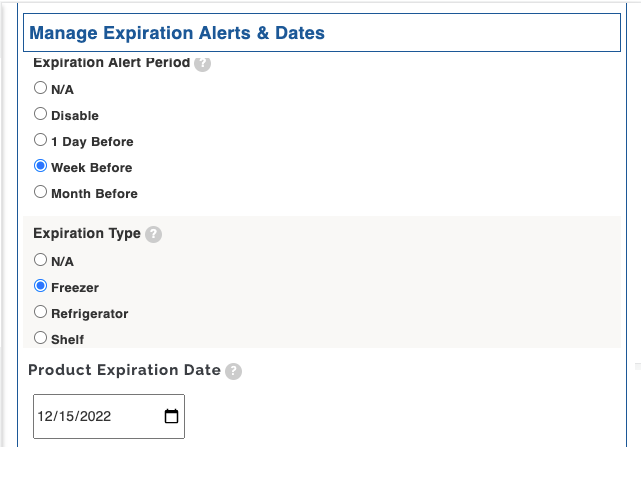
Expiration Alerts & Dates
Expiration Alert Period: Week Before
Expiration Type: Freezer
Product Expiration Date: Enter the expiration date you estimate this will last in your freezer.
Manage Quantity
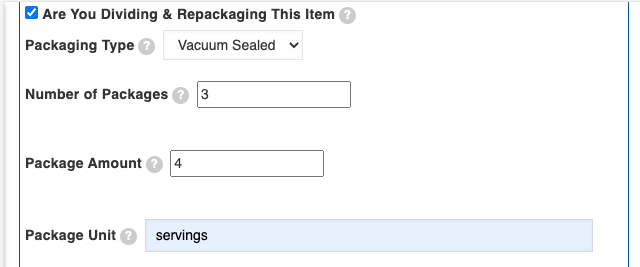
This is a homemade item that we are packaging up and adding to the freezer.
Click the box next to: Are you Dividing or Repackaging this Item?
We have 3 packages of 4 servings each.
Product Details
Fill out the remaining optional fields.

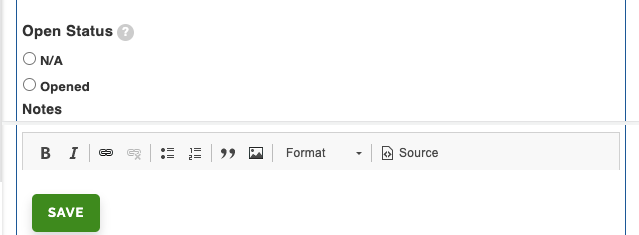
Opened Status: Leave this set to N/A.
Notes: Use this to add a note about the item.
Save the Homemade Product Item!
You can view an overall list of your items. You can also view specific lists such as:
Main Inventory of Purchased & Homemade Products
View by Storage Location
View by Diet & Nutrition
View by Time - Expiring in 1 day, 1 week and 1 month
View by Cost Per Store
View What's in the Freezer
Product Title
Navigate to your Main Inventory View by clicking the Search Inventory link.

This is a view of your main inventory. You can search by Product Type, Title or Storage Location.
These fields are set to contain. You can type part of the Product Type, Title or Storage Location name to get results.
When viewing on a smaller mobile device you will not see all of the fields. For best results view this table holding your phone in the horizontal position.
